HTML
The HyperText Markup Language is used to create web documents and pages.
Its tags let us build structurally advanced web documents, most often used as ordinary websites, company business card sites, SPA applications, online stores, blogs and so on. HTML has many types of tags, mainly responsible for the kind of content presented. Among the most commonly used and popular are headings (H1..H5), paragraphs (P), ordered and unordered lists (OL, UL), tables (TABLE), forms with many types of fields to fill in (FORM, INPUT, TEXTAREA, SELECT), images (IMG) and many others. There are also styling tags such as bold (STRONG, B), underline (U) and italics (I). In addition, there are several tags that are mainly responsible for the structure or layout of the document without significantly affecting the function or look of an element, such as sections (SECTION), articles (ARTICLE), navigation elements (NAV), footers and headers (FOOTER, HEADER), sidebars (ASIDE) and the ubiquitous, universal DIV.
Apart from the structural elements, 90% of the look is determined by the style sheet, which lets us influence a given element in any way, giving it a unique appearance, size, position relative to others and so on. In this article, however, we focus on the structure of the HTML document itself.
Nunjucks
In short, it is a rich templating language for JavaScript. It is fast, lightweight (8 KB minified), extensible with various filters and plugins, available in Node and in all modern browsers, and can be precompiled.
Of the many possibilities Nunjucks offers, in today’s article we look at templating HTML documents, which lets us efficiently build and generate repeated fragments of code in large layouts and reuse them in different views without writing or copying them from previous ones. It works on a similar principle to template systems in PHP (Twig) and the like. We can divide the whole layout into fragments and then assemble it from building blocks and mix them freely. In theory that is not much, but when you need to change a specific element that appears on every subpage, or in several places on many different subpages, it means you change it in one place only and the change applies everywhere you have used the power of Nunjucks.
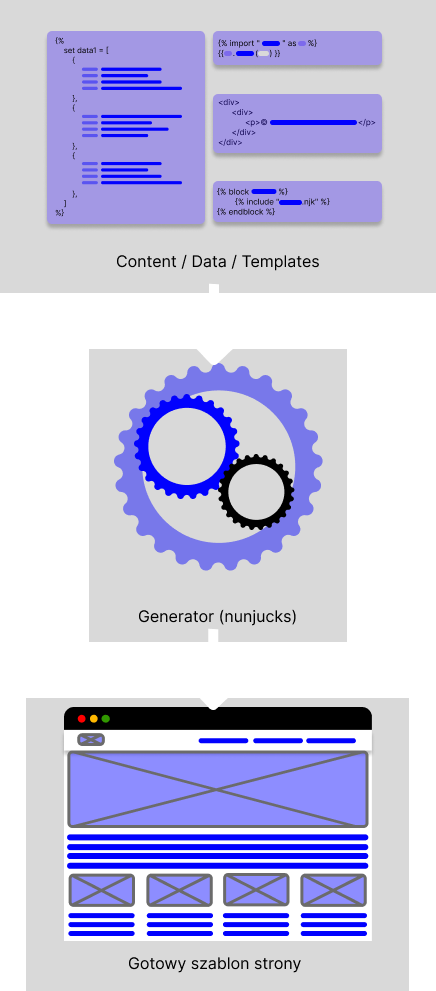
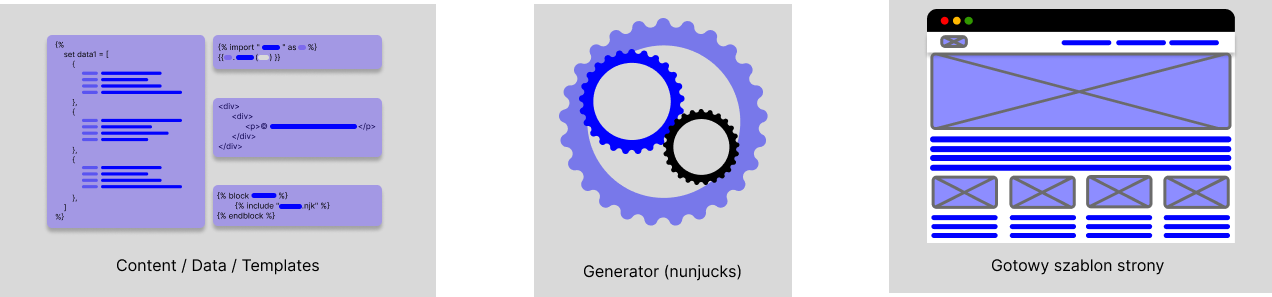
A simple example: any website with many subpages, where the header and footer are identical on each of them. In that case we create the basic document structure and extend it with specific fragments.
<!DOCTYPE html>
<html lang="en" dir="ltr">
    <head>
        <meta charset="utf-8">
        <title>lorem1</title>
    </head>
    <body>
    {% block header %}
        {% import "header.njk" as h %}{{ h.header(active=0) }}
    {% endblock %}

    {% block content %}
        <main>
            <section>
                <h1>main content</h1>
                <p>Lorem ipsum dolor sit amet, consectetur adipisicing elit. Rem sed alias quam explicabo sequi corporis asperiores blanditiis, maiores! Sit quasi a nobis fugiat, vero optio facere voluptates, repellat illum repudiandae.</p>
            </section>
        </main>
    {% endblock %}

    {% block footer %}
        {% include "footer.njk" %}
    {% endblock %}
    </body>
</html>
In the example above we have the basic structure of an HTML document, with all the required tags that define the document’s structure: the main tag, inside which we have
and . What is new are the code fragments defined in
:
{%. block name %}{%.endblock %}. Between these new tags we can place standard HTML fragments, include other hard-coded fragments from other files (footer.njk), or use a macro, a kind of function (
{% import "header.njk" as h %}{{ h.header(active=0) }}), which generates code for us based on loops, conditions, input data and so on.
An example file responsible for the footer can be a static HTML fragment with basic contact details and a copyright notice, as below.
<div class="row jcc aic">
    <div class="copy col-12 col-lg-auto ta-c">
        <p>© Okinet. All rights reserved 2023</p>
    </div>
    <div class="info col-12 col-lg-auto ta-c">
        <p>Contact us at <a href="mailto:biuro@okinet.pl">biuro@okinet.pl</a></p>
    </div>
</div>
A deeper dive into Nunjucks
The Nunjucks template system is not just about splitting code into fragments and reusing it in many places; it is also a powerful tool for generating code from input data.
First of all, we need the data we will work with. We can store it where a given fragment of code is used, or in separate files. The data structure can take one of the standard forms in JavaScript, namely a JSON object. We declare it as a variable with a specific name and the value it will take.
As an example, we will use a simplified structure for a list of typical news items, which we will keep in a separate file. Each item should have, among other things, an author, a publication date, a title, a short description and possibly a featured image.
An example object with news items might look like this:
{%
    set news01 = [
        {
            "img": "./img/newsImg01.jpg",
            "alt": "The State of Ransomware in Manufacturing and Production 2022",
            "title": "The State of Ransomware in Manufacturing and Production 2022",
            "daesc": "Ut enim ad minim veniam, quis nostrud exercitation ullamco laboris nisi ut aliquip ex ea commodo consequat. Duis aute irure dolor in reprehenderit in voluptate velit esse cillum dolore eu fugiat nulla pariatur.",
            "date": "2023-02-03",
            "author": "John Doe"
        },
        {
            "img": "./img/newsImg02.jpg",
            "alt": "Sophos MDR enables London South Bank University to deliver strategic IT priorities",
            "title": "Sophos MDR enables London South Bank University to deliver strategic IT priorities",
            "daesc": "Duis aute irure dolor in reprehenderit in voluptate velit esse cillum dolore eu fugiat nulla pariatur. Excepteur sint occaecat cupidatat non proident, sunt in culpa qui officia deserunt mollit anim id est laborum.",
            "date": "2023-02-03",
            "author": "John Doe"
        },
        {
            "img": "./img/newsImg03.jpg",
            "alt": "Sophos MDR: Results from the first MITRE Engenuity ATT&CK Evaluation for Security Service",
            "title": "Sophos MDR: Results from the first MITRE Engenuity ATT&CK Evaluation for Security Service",
            "daesc": "Lorem ipsum dolor sit amet, consectetur adipisicing elit, sed do eiusmod tempor incididunt ut labore et dolore magna aliqua.",
            "date": "2023-02-03",
            "author": "John Doe"
        }
    ]
%}
The example above shows how variables are declared between the {% %} braces; most loops and conditions are also placed between these braces. The variable name is preceded by the word “set”, while the variable itself is used with double braces: {{ news01 }}
For the data structure above, let’s now create a file with a macro that will generate the list of news items for us. We know that a single entry will contain information such as an image, an alt attribute, a title, a short description, a date and an author. The structure below shows example code we can use.
news_list.njk
{% macro news_list(object, slider=false) %}
    <div class="{% if slider %}newsSlider{% else %}newsList{% endif %} col-12 px-lg-0">
        <div class="{% if slider %}newsSliderWrapper owl-carousel{% else %}row{% endif %}">
            {% for ob in object %}
                <div class="{% if slider %}newsSliderSingle{% else %}newsListSingle col-12 col-md-6 col-lg-4{% endif %}">
                    <div class=„row jcb">
                        <div class="img col-12"><a href="#"><img src="{{ ob.img }}" alt="{{ ob.alt }}"></a></div>
                        <div class="title col-12"><h3><a href="#">{{ ob.title }}</a></h3></div>
                        <div class="desc col-12"><p>{{ ob.desc }}</p></div>

                        <div class="author col-12”><p><a href="#">{{ ob.author }}</a> - {{ ob.date }}</p></div>

                        <a href="#" class="more col-12" title="{{ ob.title }}">Read more</a>
                    </div>
                </div>
            {% endfor %}
        </div>
    </div>
{% endmacro %}
The fragment above uses several basic, well-known programming structures. We use a conditional statement
{% if slider %} … {% else %} … {% endif %}
This lets us change the look, structure and so on of a given element based on the result of the condition.
The else operator is optional and does not have to be used.
The conditional statement shown in the example in its standard form can also be used as a one-line version: {{ "true" if foo else "false" }}
We also use a loop over all the elements in the passed object,
{% for ob in object %}

	…

{% endfor %}
Thanks to this, by creating the structure of a single news item, we generate the whole list, depending on how many elements are declared in the object.
Loops let us iterate over objects, arrays and other grouping structures. We also have access to special values (loop.index, loop.index0, loop.revindex, loop.revindex0, loop.first, loop.last, loop.length) that tell us about the index and the number of elements in the loop, give us access to the first and last elements, and so on.
Nunjucks also lets us apply filters in loops, which we can use, for example, to sort elements alphabetically.
In addition, in the loop over all the objects we use variables, which are single values corresponding to individual declarations in the JSON tree.
{{ ob.title }}
{{ ob.desc }} and so on.
As with loops, variables can also have various filters applied to manipulate the data presented. Filters are a kind of function that can take arguments. We apply filters by adding the “|” character.
{{ ob.title | title }}

{{ ob.list | join(",") }}

{{ ob.desc | replace("foo", "bar") | capitalize }}
After this preparation we can now use it anywhere on the page or on many subpages. We do this by including the data file and the news list template file. Then we use the macro declared in it and pass it the necessary data.
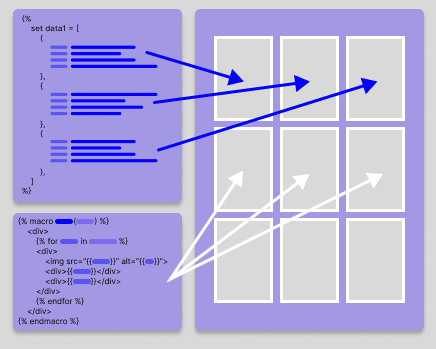
{% block content %}
    {% import "objects.njk" as ob %}
    <main>
        <section class=”news”>
            <row class=”row”>
                {% import „news_list.njk" as n %}
                {{ n.news_list(ob. news01, „false”) }}
            </row>
        </section>
    </main>
{% endblock %}
We can also use a call block, which is similar to an import, with the difference that we can call it together with the content inside the block, for example:
{% macro add(x, y) %}
    {{ caller() }}: {{ x + y }}
{% endmacro%}

{% call add(1, 2) -%}
    The result of the addition is:
{%- endcall %}
Result: “The result of the addition is: 3”.
Apart from adding and reusing fragments of code, Nunjucks also lets us extend previously prepared templates and files.
parent.html
{% block header %}
	Default header content
{% endblock %}

<section class="left">
	{% block left %}{% endblock %}
</section>

<section class="right">
	{% block right %}
		Right column content
	{% endblock %}
</section>
Then in the “child” we can use the whole structure of the “parent” and fill it in with the content we want.
child.html
{% extends "parent.html" %}

{% block left %}
    Content shown on the subpage in the left column
{% endblock %}

{% block right %}
    Content shown on the subpage in the right column
{% endblock %}
We can also use values predefined in the parent, pass them to the child and add our own content by calling the super directive.
child2.html
{% block right %}
    {{ super() }}
    Content shown on the subpage in the right column
{% endblock %}
More possibilities
With Nunjucks we can not only inherit templates, generate content and use variables, but also manipulate them freely. This is possible thanks to the arithmetic operators for addition, subtraction, division, modulo, multiplication and exponentiation. We can also use logical and comparison operators to test different values, as already mentioned earlier when discussing conditions.
Nunjucks also lets us call our own functions declared in a script.
{{ sort(1, 4, 3, 5, 9, 2, 6) }}
Regular expressions are also available; we create them much as in plain JavaScript, prefixing the expression with “r/”. You can read more about regex itself in the MDN documentation.
{% set regExp = r/^lorem.*/g %}
{% if regExp.test('Lorem, ipsum dolor sit amet consectetur adipisicing elit. In, magni.') %}
	Got it!
{% endif %}
Nunjucks offers much more, including many built-in functions and the filters mentioned above, which you can learn more about in the documentation.
In summary
In this article we focused mainly on templating views in HTML. We also mentioned many additional possibilities that Nunjucks brings, and you can read even more details in the documentation. It is undoubtedly a powerful tool that streamlines work on large projects with many views, where managing repeated content and elements can be made much easier and faster, but it also works well in simple SPAs, where it makes it easier to create and manage all kinds of lists, sliders, news items and other repeated elements.