Reverse proxy, using the nginx web server as an example

21.07.2022 | Author: Marcin Wiercioch

A reverse proxy is a technology widely used on today’s internet. Many people use it without even knowing, thanks to the popular service cloudflare.com. In this article I will try to explain the topic using the nginx HTTP server as an example.
First, though, we need to explain what a proxy is and how it differs from the “reverse” version. In the simplest model, when a user types a domain name into their web browser, the operating system looks up the domain mapping in DNS, and then the browser goes to the address it gets. This is still a very common scenario we deal with every day.

What is a proxy?

Literally, the word means a representative or substitute; in IT terminology, intermediary is a more fitting term. It is a mechanism that means the user does not connect directly to the chosen web server. Between the browser and the server serving the website there is an intermediary service, which by its nature hides the client’s identity.
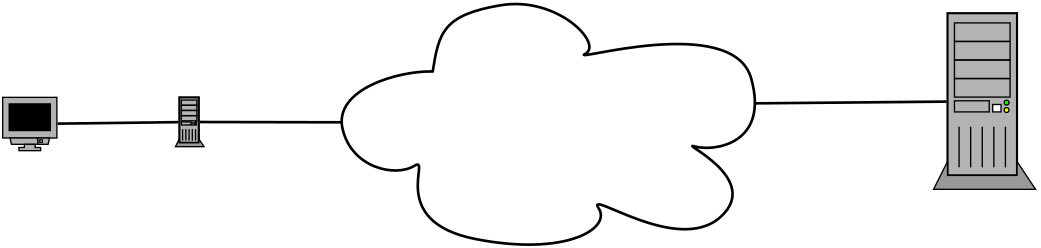
Handling website traffic with a forward proxy

For many years, solutions like this have made life easier for people who want to hide their identity. They are often used to get around regional blocking or to use different IP addresses. The list of uses for this mechanism is long, but today we focus on a variant of the proxy that has become hugely popular on the server side rather than the client side.

Reverse proxy

As in the classic version, here too we are dealing with an intermediary mechanism. In this case the proxy is reversed and works on behalf of the server. This version of mediating connections between client and server is widely used in the technologies that run web infrastructure.
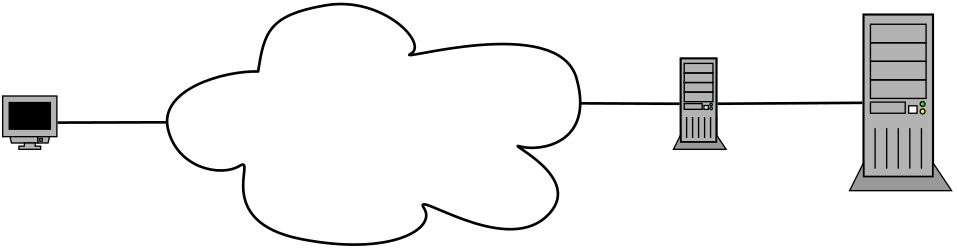
Handling website traffic with a reverse proxy

This mechanism has many advantages, the biggest of which are:

  • security: there is no doubt that adding an extra service in front of the HTTP server increases the level of security. With a reverse proxy you can hide the real addressing of the target server from the world. You can hide practically the entire infrastructure used by the system from the client. Firewall rules are often used to allow traffic to the website only from a selected address range. With Cloudflare, we should make sure to allow the whole pool of Cloudflare addresses, including the IPv6 ones.
  • caching: there are tools that implement caching at the reverse proxy level. The best known is Varnish Cache, a powerful piece of software with many useful features: modifying content and headers, support for ESI (Edge Side Includes), load balancing and much more. The only thing Varnish lacks in its default configuration is SSL support.
  • high availability: today high availability is provided in several ways, but the most popular is horizontal scaling. This practice requires a so-called load balancer. The most popular solutions of this kind are Nginx and HAProxy.

Less obvious uses

Thanks to its flexibility, the reverse proxy has found a number of uses that may seem strange at first glance.

One domain, many applications

Sometimes when building web applications you need to set aside a subdirectory of a domain to serve a completely different website. This is also possible in a classic HTTP server configuration, but when you need to move part of a website as a microservice to a completely different place, a problem arises. That is when a reverse proxy helps, letting you route traffic to several different destinations depending on the requested URI.

Below I show a reverse proxy configuration for this scenario, using Nginx as an example.
Let’s assume we have a correctly installed nginx server, for which we will create a new vhost

sudo nano /etc/nginx/sites-available/example.com.conf
server {
listen      80;
server_name example.com www.example.com;
index       index.php;
root        /var/www/example.com/web 

location / {
try_files $uri $uri/ /index.php?$query_string;
}

location /blog {
proxy_pass http://10.0.0.100:80;
proxy_http_version                 1.1;
proxy_cache_bypass                 $http_upgrade;

proxy_set_header Upgrade           $http_upgrade;
proxy_set_header Connection        "upgrade";
proxy_set_header Host              $host;
proxy_set_header X-Real-IP         $remote_addr;
proxy_set_header X-Forwarded-For   $proxy_add_x_forwarded_for;
proxy_set_header X-Forwarded-Proto $scheme;
proxy_set_header X-Forwarded-Host  $host;
proxy_set_header X-Forwarded-Port  $server_port;

}

The configuration file above handles the domain example.com. All requests are sent to index.php, which in this case acts as the front controller of a web application. The interesting things happen later, though. A separate configuration is defined for the /blog location, which forwards traffic to a completely different place. With this solution we have “split” the domain, which lets us host a website, in this case the blog, on a completely different server.
Finally, we set the correct HTTP headers so that the target server can read the source address of the request.

Web applications running in Docker

For several years, containerisation has been triumphing in the world of server infrastructure. The technology largely behind this success is undoubtedly Docker. Thanks to its popularity, a huge number of applications, not only web ones, are published as Docker images. Such images can be used to develop your own software, but they can also be run for everyday use.
Administrators who do not want to run Kubernetes clusters for single containers often decide to use reverse proxies.
Let’s assume that we want to run several websites on one machine that have previously been “dockerised”. Each of these applications runs on port 80 by default. The problem is that one machine cannot provide the same port to several web applications at once. This is where the reverse proxy helps. Just set each website running as a Docker container to a different port, for example 8080, 8081, 8082 and so on. Then all that remains is the right nginx reverse proxy configuration so that each website works correctly.

Summary

Thanks to its flexibility and performance, Nginx gives us huge possibilities, including as a reverse proxy. This mechanism has practically become a standard on today’s websites. The arrival of services such as Cloudflare has definitely sped up the adoption of this mechanism in smaller web applications too. Today you do not have to be a top-class specialist to quickly and efficiently provide a high level of security for your website.


Related technologies

Marcin Wiercioch Marcin Wiercioch

full stack developer

Co-founder of Okinet, PHP developer, full stack developer, Linux administrator and technology enthusiast with 20 years of experience. Lately I have been focusing especially on optimising and automating development environments, which makes the web applications we build efficient, secure and easy to develop further.

All articles by this author

Share

Rate this article

Let’s talk
about your project

+48 506 160 480
biuro@okinet.pl

or write to us