
REST APIs have become the standard in today’s web applications. They are a widely used mechanism that makes it easier to integrate systems. This trend was built on the popularity and simplicity of the HTTP protocol. A huge role in spreading this technology was played by the tendency to build software divided into a frontend layer, handled by browser frameworks (Angular, React, Vue), and a server layer. What connects the two into one whole is a consistent API for exchanging information: REST.
The creators of the most popular platform for building websites, which is undoubtedly WordPress, also had to keep up with these changes. The REST API finally became an integral part of WordPress in 2016 with the release of version 4.7. Before that, developers managed by using plugins that extended the standard capabilities, or simply wrote their own solutions from scratch.
So what exactly does the WordPress REST API provide?
It introduced a mechanism for retrieving the content of a website by calling the right endpoint, for example from JavaScript. This is of course a big simplification, but it captures the goal the authors of this solution had in mind: making it possible to build web applications that can use WordPress as their backend. Every installation already has this feature enabled, so it is enough to type this address into the browser:
https://domena/wp-json/wp/v2/
Then we should see what we are sharing with the world, perhaps without being fully aware of it.
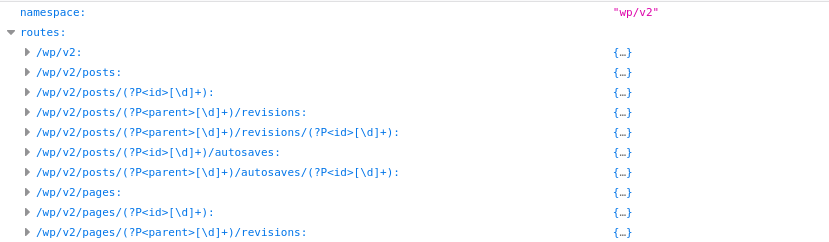
It is simply a list of the available endpoints supported by our website. It is easy to see how you can retrieve information about the list of posts or a specific page.
https://domena/wp-json/wp/v2/posts
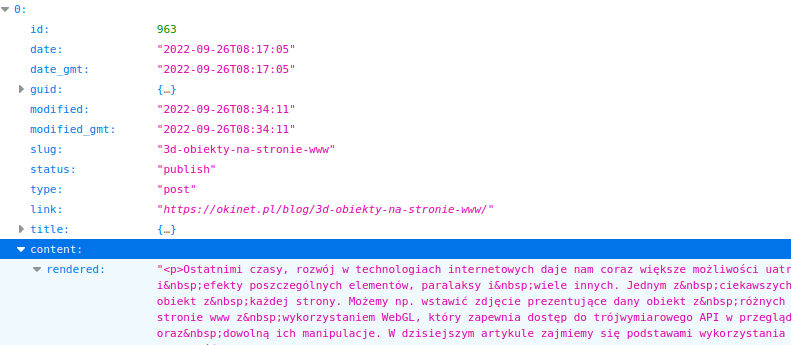
Owners of popular blogs often build their own mobile and web apps that are fed with data obtained in exactly this way.
And what if we wanted to add something of our own?
To fully appreciate the WordPress REST API ecosystem, you need to face the task of building your own endpoints on top of the existing solution. Imagine that our website performs some non-standard function, which we then need to make available to an external partner.
Let this function be sending an email from the backend. First we “hook in” through the well-known and well-loved system of filters and actions.
<?php
add_action( 'rest_api_init', function () {
  register_rest_route( 'myplugin/v1', '/send_message', [
    'methods' => 'POST',
    'callback' => 'my_send_message_function',
  ] );
} );

function my_send_message_function($data)
{
    /**
      * filter the input data and send the message
      */
}
This is how we define our own endpoint addresses in our web application. The one in the example above will be available at:
https://domain/wp-json/myplugin/v1/send_message
What about restricting access to the API?
In the real world we need to think about the security of our web application, and therefore about a permissions system for individual resources. Fortunately, WordPress already has one, and you just need to know how to use it. By default, the WordPress authentication system is based on cookies, but we will not be able to use it for communication with the REST API, because we could run into a number of CSRF problems. Web applications usually handle this with JWT, basic auth or some kind of header containing a control key. The WordPress developers suggest using so-called “nonces”. We, however, will use the external plugin “JWT Authentication for WP REST API”, which lets us build our authentication system on JSON Web Tokens.
Authentication in a web application with JWT involves sending a token to the endpoint address as a header or a variable. With this plugin we will rely on an HTTP header:
Authorization: Bearer {JWT}
To obtain a token, we first need to call the action in our REST API responsible for generating tokens. The code below shows how to prepare the call in your client application.
curl -X POST "https://domain/wp-json/jwt-auth/v1/token" -H "accept: application/json" -H "Content-Type: application/json" -d "{ \"username\": \"john.doe@domain\", \"password\": \"userpassword\"}"
In response we should receive JSON containing the token and some additional information
{
    "token": "JWT",
    "user_display_name": "admin",
    "user_email": "john.doe@domain",
    "user_nicename": "admin"
}
The token we obtain will be used to authenticate our requests to restricted resources.
The WordPress REST API system offers huge possibilities for developing our website right from the start. Suffice it to say that with the right “custom post type” configuration we can easily add or remove further endpoints generated automatically by WordPress. Thanks to the ability to extend the built-in mechanisms, the WP REST API architecture becomes a stable foundation for developing web applications based on WordPress.