Laravel is a PHP framework for building web applications, B2B portals and SaaS systems. It helps you build processes that fit your business: from managing accounts and data, through integrations, to tasks that run in the background.
Laravel: web applications, APIs and business systems
Laravel: an application that fits the way your business works
When serving a customer means jumping between spreadsheets, email and several systems, it is worth looking at the whole process. Laravel gives you a foundation for building an application that ties its stages together: from taking a request, through approval, to delivery and reporting. It is a PHP framework, meaning a set of tools and rules for organising code that developers work with.
You can build a customer portal, a booking system, a B2B platform, a SaaS application or an integration back end on it. Features are built to match the project’s requirements. At Okinet, we can help you define the scope of such a solution and decide which parts are worth launching in the first stage.
When Laravel is a good choice
Laravel is worth considering when off-the-shelf software does not support important rules in your business, or when adapting it needs more and more workarounds. One example is a portal where different partners see their own trading terms, place orders and go through their own approval process.
The framework provides the basic building blocks of an application, but business processes have to be designed and built. That gives you more say over how the system works, along with responsibility for developing it. For a simple company website or a standard online shop, a ready-made CMS or e-commerce platform may be the more sensible choice.
We make the decision based on requirements, integrations and expected maintenance. Laravel is not a ready-made admin panel for running a business; it is a tool for building one.
The application interface: Blade, Livewire or Vue
Laravel lets you choose how to build the interface to suit the project. Blade is used to create HTML templates on the server. Livewire lets you build interactive views with logic written mostly in PHP. This is useful for things like forms and operational dashboards.
For a more complex interface, you can use Vue.js with Inertia. This combination lets you use Vue components while keeping routing and controllers on the Laravel side. A separate API is still an option when, for example, a mobile app or several independent consumers of the data need it.
Official starter kits help set up the basics of a project, including user accounts. The look, permissions and the product’s actual features still need to be tailored to your process.
Eloquent and the database: keep process information in order
Eloquent is the layer that connects application objects with records in the database. It lets you describe models, such as a customer, an order or a ticket, and the relationships between them. This makes it easier to build features that use the same information in different parts of the system.
Migrations record changes to the database structure in code. This means the team can apply agreed changes to both the test and production environments. When deploying, however, you have to consider existing data, backups and the order of operations.
Convenient database work does not remove the need to check performance. The number of queries, how related records are loaded and indexes all matter, especially with long order lists or reports. These areas are worth testing on data that reflects real use.
Login and permissions: access that matches the user's role
In a business application, confirming who someone is must be kept separate from permission to carry out a specific action. A logged-in employee may have access to their own department’s tickets, but not to all company data. Laravel’s authorisation tools, including policies and gates, help you write these rules into the application.
Permissions should be checked on the server whenever data is read or changed. Simply hiding a button in the interface does not restrict access to the action. In systems serving many companies, rules that keep each client’s data separate are especially important.
Secure deployment also covers data validation, session settings, protecting secrets and updating dependencies. The framework provides tools that support these tasks; using them correctly remains part of the project work.
APIs and integrations with external systems
Laravel can expose data through an API and communicate with external services. This is the basis for connecting a customer portal with an ERP, warehouse, CRM or payment system. The built-in HTTP client helps handle requests, timeouts and service responses.
Sanctum is used, among other things, to authenticate your own single-page applications (SPAs) and to provide access through API tokens. We choose how to use it based on who will consume the API and on the architecture. A token on its own does not replace checking which data a user is allowed to see.
For an integration, we agree what happens when a connection drops, how to retry an operation and how to avoid creating the same order twice. You also need information about errors and the last successful sync. This way, handling an integration does not end with sending a request to the other system.
Queues and Horizon: tasks that run in the background
Sending messages, importing a product catalogue or preparing a report do not always have to finish within a single user request. Laravel queues let you hand work over to processes running in the background. The user can get confirmation that the task has been accepted and collect the result once it is done.
These tasks need worker processes that are running. We set run times, retry rules and how failures are handled. A task should also allow for being run again, so that it does not send the same instruction more than once.
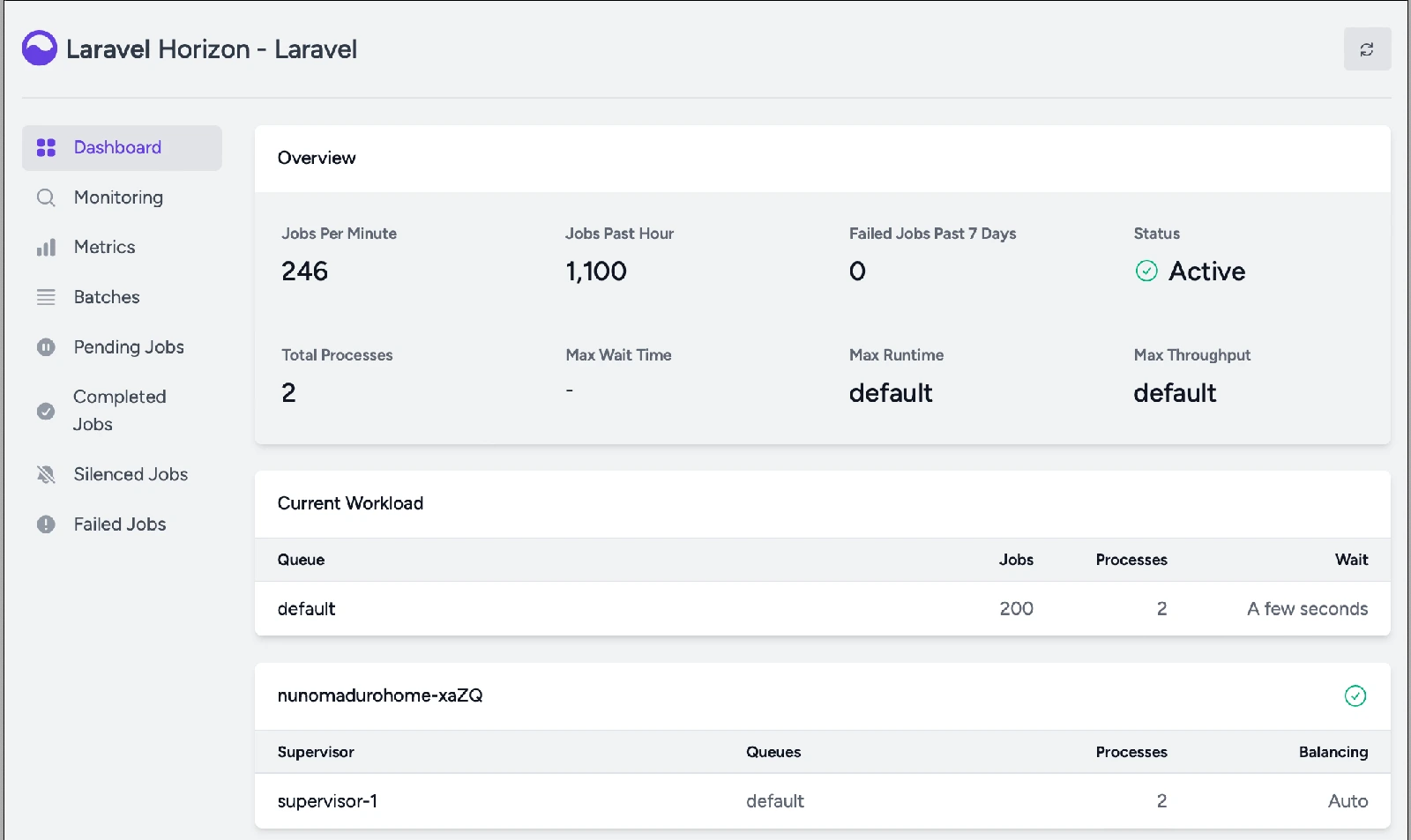
Laravel Horizon provides a dashboard and process configuration for Redis-based queues. Among other things, it shows load, completed jobs and errors. This helps you notice that imports have started to slow down before a large backlog of unfinished operations builds up.
Task scheduling: automating everyday operations
The Laravel scheduler lets you describe in code when commands and tasks should run. You can use it for regular syncs, reminders, data clean-up or preparing reports. The server must be set up to run the scheduler regularly.
For longer operations, it is important to stop runs from overlapping. In an environment with several servers, you also have to decide whether a task should run only once. Laravel offers tools to support these scenarios, but they need proper configuration, including a shared lock store.
Automation should have a visible result: when it last ran, its status and any error. Then the team knows whether the scheduled process actually finished.
Cache and file storage
A cache lets you store the results of selected operations and read them without doing the same work again. In Laravel, you can use it for things like reference data or expensive reports. Refresh rules must match how quickly the data needs to reflect changes.
A shared file storage interface makes it easy to use a local disk as well as S3-compatible services. For example, we might consider Cloudflare R2 for documents and other application files. This kind of setup requires configuring access and checking which operations are supported.
Private files, such as customer documents, should have different sharing rules from public product photos. So the design covers both where files are stored and access control, as well as rules for deleting data.
Reverb: updates without manually refreshing the page
Laravel Reverb is a WebSocket server that works with Laravel’s event broadcasting. It lets you send information to the interface in real time: a change in ticket status, the progress of an operation or a new message.
It is useful where several people work on the same processes and need to see changes quickly. The feature requires setting up events, handling them in the interface and proper channel authorisation. Keeping WebSocket connections open also has to be planned into the infrastructure.
We choose this approach when frequent updates bring the user a real benefit. A simple reporting screen does not always need a constant connection to the server.
Pulse and tests: keeping the application in check
Laravel Pulse helps you monitor application performance and usage. It can point to slow requests, database queries or queued jobs. The information it gathers makes it easier to choose what to optimise based on measurements.
Automated tests play a different role: they check expected behaviour before a change is deployed. Laravel supports working with Pest and PHPUnit, as well as testing HTTP requests and database operations. In a business project, tests for price calculation, permissions and status changes are especially valuable.
The range of data collected and access to diagnostic dashboards must be controlled. Application monitoring is worth combining with monitoring of servers and services, for example using Zabbix.
AI features as part of the application
The Laravel AI SDK provides a common interface to selected AI model services. It lets you build features that use things like text generation, tools and vector representations (embeddings). In a business system, this can be a starting point for classifying tickets, drafting replies or working with documents.
An integration requires deciding what data is sent to the provider, the costs and how results will be assessed. Where mistakes matter, a review step is needed. The SDK makes it easier to connect to a model, but the process logic and responsibility for the result have to be designed separately.
Deploying Laravel and keeping up with new versions
The application needs an environment that supports the chosen PHP version, the database and the services used in the project. If it uses queues or the scheduler, these must also run in production. Deployment should cover configuration, database migrations, restarting worker processes and the ability to restore data.
You can use your own infrastructure or services from the Laravel ecosystem that support hosting or server management. The choice depends on operational requirements and budget; using the framework does not tie you to a single provider.
Laravel 13 requires PHP 8.3 or later. For a new project, we also check that the required packages are compatible and how long the version will be supported. We plan updates as part of maintenance, with tests of key processes, rather than putting them off until support for the version in use ends.
How we can plan your Laravel application
We start with how users work, the data and the integrations. We agree which tasks the application should improve, who will use it and what constraints it must take into account. From there, we can choose the architecture and the scope of the first release.
The next stage covers interface design, building the processes, testing and preparing the environment. Documentation and maintenance rules also matter: access to the code, incident handling and an update plan. These are what make it easier to keep developing the system after launch.
Let’s talk about your application. We can help you judge whether Laravel suits the project and how to split the work into stages that deliver something useful for your team.