Symfony lets you build PHP applications around your company’s processes: from B2B platforms and customer panels to APIs, integrations and background tasks. See how its components help keep system development organised, diagnose problems and plan the next stages of a rollout.
Symfony: business applications, APIs and integrations
Symfony: an application shaped around your company's processes
Symfony is a PHP framework and set of components for building web applications, APIs and internal systems. It provides ready-made mechanisms for handling requests, forms, permissions and messages. Your business rules, however, remain part of the application being designed: from how a price is calculated to the conditions for approving an order.
It is a good direction when an off-the-shelf system needs more and more workarounds. You can design a partner panel, a document workflow or a B2B platform around the way your team really works. The framework itself is not a ready-made CRM or online shop: it gives you a foundation to build or extend them.
At Okinet we start this conversation with processes, data and integrations. Agreeing who carries out each task and what should happen next lets us plan a sensible first scope for the application.
When Symfony is worth choosing
You gain the most when the value of your product comes from your own logic and development will continue for years. One example is a platform where every trading partner has a different price list, several people approve purchases and each order has to reach the warehouse system.
- B2B platforms: individual trading terms, purchasing limits and roles within the customer’s organisation.
- Operational applications: handling tickets, documents, bookings or billing.
- APIs: shared access to data for a web panel, a mobile app and partners.
- Integrations: exchanging data between an online shop, ERP, CRM and external services.
For a simple company website with a few pages, a custom application may not justify the cost. The choice should be based on requirements, the availability of the team and the maintenance budget, not just on how popular a technology is.
Components and an architecture that can grow in stages
Symfony lets you separate responsibilities in the code. Payment handling, discount rules and sending notifications can work as separate application services. The service container provides them with the dependencies they need, so the same connections don’t have to be recreated in many places.
For your product, this means you can change one area while touching the others less. It does, however, require a good code structure and tests: the framework won’t design the boundaries between modules for you.
At the start, one application with clearly separated modules is often enough. Splitting it into microservices only makes sense when there are specific needs, for example deploying parts of the system independently or different performance requirements.
APIs and integrations with ERP, CRM and payments
Symfony can expose an API and use services from other systems. The HttpClient component helps handle HTTP connections, but every integration still needs an agreed data contract: fields, identifiers, authorisation and how to react to errors.
When passing orders to an ERP, you need to decide which system is the source of truth for prices and stock levels. Just as important is how the application behaves when the ERP doesn’t respond for a few minutes. We can plan for the operation to be retried, its status to be recorded and a message to be shown to the operator, instead of leaving the user with an unclear error.
It is also important to guard against the effects of receiving the same information more than once. A repeated payment webhook should not trigger order fulfilment again. Rules like these are designed into the application and checked in integration tests.
Messenger: queues and background tasks
Generating a large report, importing products or sending messages don’t always have to finish before the user sees a response. Symfony Messenger lets you hand a message over to be handled immediately or, once a transport is configured, run the task asynchronously.
For example, a customer requests a data export and can carry on using the panel. A separate process prepares the file and the application lets them know when it is ready. Messenger provides mechanisms for retrying failed tasks and sending them to a failure transport, if one has been configured.
A queue requires worker processes to be kept running, a watch on the backlog and well-thought-out handling of retries. When importing a thousand products, it also matters that you can see which items have already been saved and why the rest were not processed.
Workflow: orders and documents with clear stages
The Workflow component describes the states of a process and the allowed transitions between them. You can model the path of a quote from draft, through approval, to being sent to the customer. Transition conditions let you check, for example, that the data is complete or that the required approval has been given.
On a B2B platform, an order may first need a manager’s approval before it goes on to fulfilment. Instead of status checks being scattered across many screens, the team has a single description of how the process is allowed to run.
You also need to define the exceptions: sending a document back for corrections, cancelling an order and what happens after a failed integration. These often decide whether the application really fits the company’s day-to-day work.
Security, permissions and data validation
The Security component separates confirming who a user is from deciding what that person is allowed to do. Roles help define general permissions, and the voters mechanism lets you take a specific object into account, for example whether an invoice belongs to the customer’s organisation.
Hiding a button in the panel is not enough. Access has to be checked on the server, including when someone calls an API address directly. In an application that serves many companies, keeping their data consistently separate is especially important.
The Form and Validator components help handle forms and data validation rules. In practice, you can check required fields, value formats and conditions that come from the process. Form security, dependency updates and permission tests should be part of the rollout and of ongoing maintenance.
Doctrine and a database that fits your application
Symfony often works with Doctrine, a separate library that makes it easier to map application objects to data in a relational database. In this setup you can use MySQL, among others. Migrations help record each change to the database structure together with the code.
Choosing an ORM doesn’t remove the need to design queries and indexes. A list of orders may work well on test data but slow down as the number of records grows. Then you need to check what information the application fetches and how many queries it runs.
When updating the system, we also plan the order of changes. The new version of the code and the database migration must work together, and operations on data require a backup and a tested way of restoring it.
Twig, Symfony UX and a Vue frontend
There are several ways to build the interface of a Symfony application. Twig generates HTML on the server, and Symfony UX tools help add interactivity. This is worth considering for panels and websites that don’t need a separate frontend application.
If your product requires a lot of on-screen work (for example a configurator, many linked filters or editing data without reloading the page), Symfony can handle the API and Vue.js the interface layer. This split lets both parts be developed separately, but it increases the amount of integration, testing and authentication work.
We match this setup to how the product is used. Having a separate frontend does not in itself guarantee ease of use or a fast website.
Profiler and cache: performance based on measurements
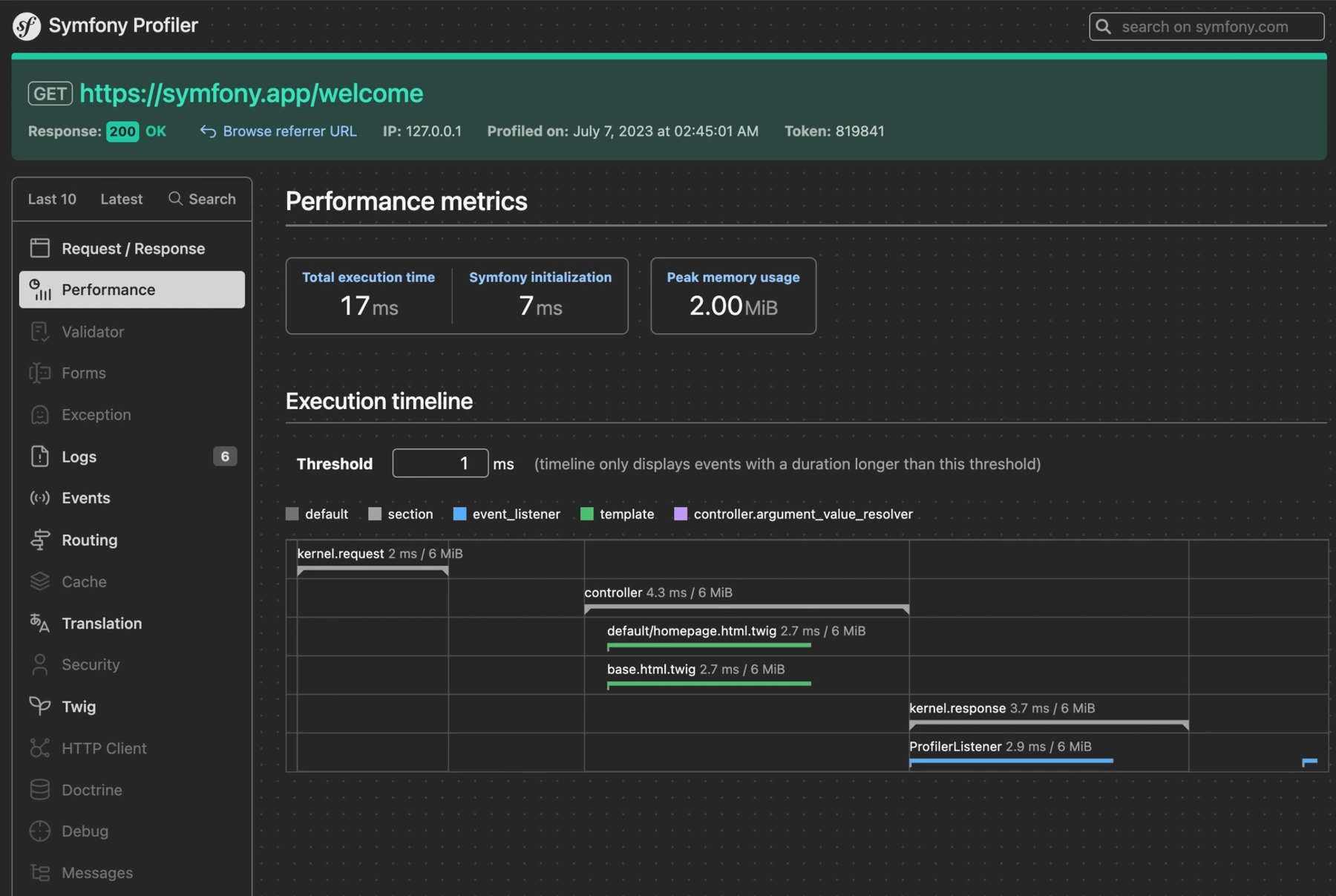
The Symfony Profiler shows the details of how a request was handled: execution time, memory use and information gathered by individual diagnostic modules. It lets you check whether a delay comes from the database, rendering the view or communication with an external API. It is a development tool and should not be switched on in production.
A cache lets you store the result of a calculation or data fetch and reuse it. First you need to decide how long the result stays valid and what should invalidate it. A price that depends on the trading partner needs different rules from a public product description.
The application cache can be complemented by a CDN layer, for example Cloudflare. Public content must then be kept separate from private responses in the customer panel. Making things faster must never lead to one person seeing another user’s data.
Error diagnostics, tests and monitoring
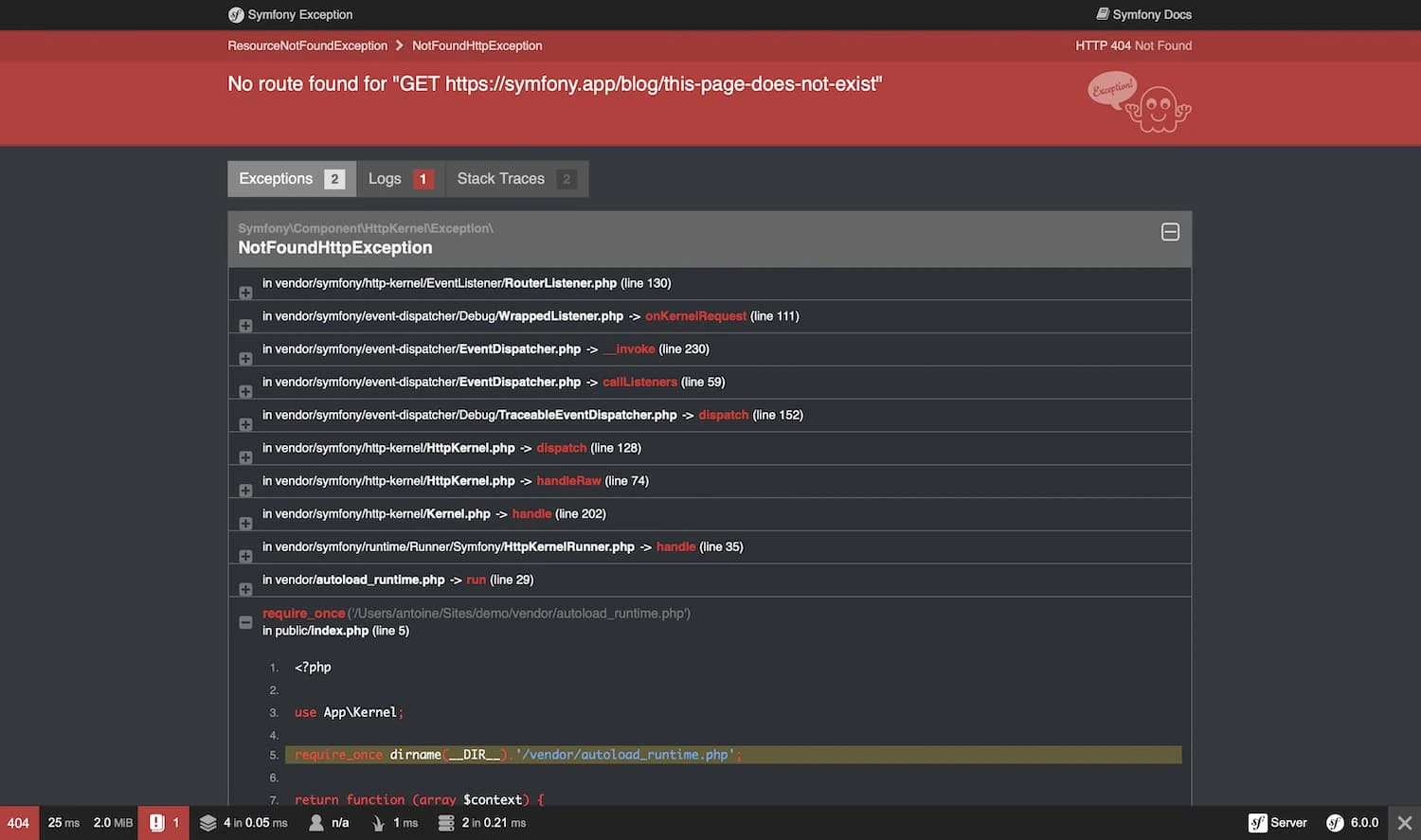
In the development environment, Symfony can show an exception page with the stack trace and the context of the error. The developer can then see exactly where handling of the request stopped. In production, the user should get a safe message, and the technical details should go to logs available to the authorised team.
Automated tests let you check business rules, how modules work together and the most important user journeys. For an ordering platform, it is worth covering at least discount calculation, purchase approval and access to documents. This gives every update a concrete set of conditions to meet before it goes live.
After launch, monitoring is also needed. Zabbix can keep watch over service availability and infrastructure resources and, once configured, selected application metrics too. It is worth separately tracking integration errors and tasks waiting in the queue, because a running server does not yet mean orders are being handled correctly.
Symfony and Sylius in e-commerce projects
If you are building an online shop or a trading platform, it is worth considering Sylius, which is built on Symfony and provides e-commerce features. It is a different starting point from building a catalogue, basket and order handling from scratch.
Symfony gives you freedom to build a business application, and Sylius adds a sales model that can be adapted to the project’s requirements. The choice depends on how much of your product is about selling and how much involves processes that go beyond the shop.
Before deciding, we look at B2B price lists, product variants, how orders are fulfilled and integrations, among other things. This lets us judge which features we can take from the platform and which need to be built ourselves.
Symfony or Laravel: choosing for the project and the team
Both Symfony and Laravel can be used to build complex PHP applications. The size of the company or the number of screens alone doesn’t tell you which framework to choose.
It is worth comparing the team’s experience, the existing code, the libraries available and the maintenance plan. Symfony can be a good fit where you want to deliberately assemble a solution from components and organise dependencies precisely. Laravel is worth assessing in terms of its conventions and ecosystem of tools for the product in question.
If you already have a working application in one of these frameworks, changing technology should solve a specific problem. Improving the architecture, integrations or tests often brings more value than rewriting the whole system.
Deployments, updates and developing an existing Symfony application
A repeatable environment makes it easier to diagnose problems and release new versions. Docker can help organise the dependencies of the application, the database and worker processes. Code in a repository and automatic checks of changes support a controlled deployment process.
For maintenance, the Symfony release line you choose and its support period matter. LTS (long-term support) versions let you plan development over a longer horizon, but they still need patch updates, a compatible PHP version and care for third-party libraries.
We begin modernisation by checking versions, dependencies, tests and the areas that matter most to how the business runs. Then the next steps can be planned: removing outdated calls, updating libraries, trials in a test environment and a controlled release. Rebuilding the whole application is not always necessary.
How to plan a Symfony project with Okinet
A good starting point is a description of one process that causes difficulty today: retyping orders by hand, customer data spread across different places or approving documents by email. Based on this, we can agree roles, the integrations needed and the scope of the first stage.
The budget depends mainly on the business rules, the interface, data migration and the quality of documentation for the systems being connected. It is also worth including testing, monitoring, updates and responsibility for maintenance after launch.
Let’s talk about your Symfony application, whether it is a new product, an integration or developing an existing system. Together we will work out which changes are worth starting with.
Illustrations from the Symfony documentation: Symfony contributors, CC BY-SA 3.0. Source materials are listed below.
Sources: official documentation
- Symfony documentation
- Service container
- HttpClient and HTTP communication
- Messenger and queues
- Workflow
- Security and permissions
- Forms
- Doctrine and databases
- Frontend
- Profiler: documentation and illustration
- Cache
- Error diagnostics: documentation and illustration
- Testing
- Releases and support periods
- Sylius